
UKG Pro Learning
UKG, Inc.Business
3.0121.00 Reviews
- Version
- 12.2.1
- Installs
- 100.00K
- Age Rating
- Everyone
Screenshots
Our Review of UKG Pro Learning
 Analysis by Appyee
UKG Pro Learning is a business app from UKG, Inc. that I see as a companion for workplace training rather than a general learning platform. Its purpose is straightforward: give employees a mobile way to reach learning connected with their organization’s UKG Pro environment. That distinction matters. The app can be useful when your employer already uses UKG Pro Learning, but it is not the kind of tool I would install expecting a large public library of unrelated courses.
My first impression was practical rather than exciting. The appeal comes from convenience: training can fit into the gaps around a working day instead of requiring a separate visit to a desktop portal. If your company assigns courses, compliance material, onboarding lessons, or professional development through this ecosystem, having that work available on a phone can remove a small but meaningful barrier.
The app is free to download and is rated for Everyone, which makes sense for a workplace tool used by people with different roles and ages. It supports Android 8.0 and later, and the current version is 12.2.1. UKG Pro Learning has been available since October 9, 2017, so I approach it as an established companion app rather than a brand-new experiment.
What makes the first week useful
The first week is where the app has its clearest advantage. When a manager or training coordinator tells me that a course is waiting, I do not need to remember to open a browser later or find the correct company portal on a computer. A mobile learning app makes the next action feel closer and more immediate. That is especially helpful during onboarding, when there are already many systems, passwords, policies, and introductions competing for attention.
I would use it in a realistic situation like this: I finish a shift with a short training assignment still outstanding, sit down during a commute or a quiet break, and use the phone to continue the material. The value is not that a phone magically improves learning. The value is that the training is available at the moment when I have a few usable minutes. For employees who rarely spend time at a desk, that change can be more important than a more elaborate interface.
The app also makes sense for distributed teams. A worker in a store, warehouse, clinic, field role, or shared office may not have constant access to a personal computer. In those cases, a mobile route can make learning feel less like an administrative appointment. I would still prefer a larger screen for long reading or detailed assessments, but the phone is a sensible starting point for short sessions and quick progress checks.
One useful habit is to treat the app as a place for scheduled learning rather than something to browse aimlessly. If I open it with a specific assignment in mind, I am less likely to waste time searching or assume that the app should behave like a public education service. The employer’s setup determines what appears, so the quality of my experience depends heavily on how thoughtfully the organization has arranged its learning content.
That dependence is the first important trade-off. UKG Pro Learning can feel focused because it is tied to workplace needs, but it may also feel sparse or limited if the organization has not assigned much material. A person looking for independent language lessons, hobby courses, or a broad catalog should choose a dedicated consumer learning service instead. This app is strongest when there is already a work-related learning relationship behind it.
Signing in and finding a useful routine
For a new employee, the most important question is not whether the app is free. It is whether the organization has enabled access and explained how employees should sign in. I would confirm the correct workplace credentials and organization instructions before blaming the app for an access problem. A mobile learning tool cannot replace the account setup managed by an employer.
Once access is working, I recommend checking the assigned learning area first and resisting the temptation to judge the entire product by the number of visible items. In a corporate environment, a short list may be intentional. It can represent exactly what the employee needs for a role or stage of onboarding rather than an attempt to offer everything to everyone.
I also find it helpful to divide learning into two kinds of sessions. Use short breaks for watching or reading manageable pieces, then reserve a quieter period for assessments or material that requires concentration. This prevents the common mistake of starting a course while distracted and later having to repeat sections simply because the setting was poor.
Why the value may last beyond the novelty
After the first week, the question changes from “Can I access training on my phone?” to “Will this remain useful month after month?” My answer is conditional but positive. The recurring value comes from the connection between the app and an employer’s learning program. New hires may return during onboarding, existing staff may revisit required material, and teams may use it when responsibilities or procedures change.
That is a quieter kind of value than the novelty of installing a new app. I would not expect to open UKG Pro Learning every day without a reason. Instead, it earns space when the organization regularly places relevant work in it. A tool does not need daily entertainment value to be worthwhile; it needs to reduce friction whenever its particular job appears.
The strongest long-term use case is a workplace where learning is continuous rather than limited to one introductory course. If training is refreshed, assigned according to role, or used to support development, the mobile format can help employees keep up without making every session dependent on a desktop. If the employer only uses it once during onboarding and never returns to it, the app may become dormant after the initial task is complete.
This is also where expectations need to stay realistic. I would not call the app a personal knowledge-management system. It is not a replacement for taking detailed notes, practicing a skill, asking a supervisor for clarification, or using specialist reference material. Its job is to provide access to assigned learning, not to become the complete record of everything I know about my work.
A practical long-term workflow is to pair each course with an action outside the app. After completing material, I might write down one procedure to apply during the next shift, one question to ask a manager, or one skill to practice. That makes the mobile session produce a workplace result instead of becoming a box-ticking exercise. The app supplies access; the employee still has to turn information into behavior.
Where it compares well with usual alternatives
Compared with a normal browser-based company portal, a dedicated mobile app can feel more convenient for quick checks and short learning periods. I do not need to treat every assignment as a full computer session. That is the clearest reason to choose it when both options are available.
Compared with broad learning marketplaces, UKG Pro Learning is more relevant to the employee’s workplace context but less useful for personal exploration. A public platform may offer more variety and a smoother experience for self-directed study, while this app is better aligned with training selected by an employer. The right choice depends on whether the goal is completing assigned workplace learning or building a private curriculum.
Compared with email attachments and scattered documents, a central learning app can make training easier to return to. However, it should not be judged as a full communication channel. If instructions are unclear, a message to a manager or training team may still be necessary. I would use the app to complete and revisit learning, not to assume that every workplace question will be answered inside it.
Its public footprint suggests that it is used at a meaningful scale, with over 100 thousand installs. Still, the average rating is 3.0 from around 364 ratings, so I would keep expectations measured. That rating does not tell me exactly why every person was dissatisfied, but it is a useful reminder that employer configuration, login experiences, device differences, and the limits of a work-specific app can affect how people feel about it.
Maintenance: what it asks from me over time
The maintenance burden is fairly light in one sense: there is no reason to keep browsing it when I have no assigned learning. The harder part is keeping a reliable habit when training arrives irregularly. If I only open the app when a deadline is close, it becomes associated with pressure rather than steady progress.
I would keep notifications, account details, and workplace instructions organized outside the app as well. If an assignment matters, I would note its due date in the same calendar or task system I already use. Relying on memory alone is risky, especially when learning is mixed with shifts, meetings, and other employee responsibilities.
Another maintenance issue is device suitability. A phone is convenient, but it is not always the best screen for dense content, extended reading, or careful assessments. My approach would be to begin on mobile, then move to a computer when concentration, typing, or visual comfort becomes more important. The app should be part of the workflow, not a rule that every learning task must happen on a small screen.
Keeping the application updated is sensible, particularly because the current version is 12.2.1 and the supported Android baseline is 8.0. I would not make an update routine into a major chore, but I would avoid leaving the app untouched for a long period and then opening it immediately before an important assignment. A quick check ahead of time is a simple way to discover whether access still works on the device I plan to use.
For employers, the maintenance question is larger. The app’s recurring value depends on training administrators keeping assignments relevant and instructions clear. If old material remains visible, if courses are poorly organized, or if employees do not understand why a lesson matters, the app may be blamed for a content problem. In my view, the mobile experience works best when the organization treats it as part of a learning process rather than merely another place to upload files.
What creates fatigue after the first few sessions
The main source of fatigue is repetition without visible purpose. If every visit feels like another mandatory task with no connection to daily work, I lose motivation quickly. That is not unique to this app, but a mobile format can make the problem more noticeable because the phone is always nearby. Easy access does not automatically create interest.
Another source is switching between devices. Starting on a phone, moving to a browser, searching for the same course again, and trying to remember where I stopped can make a simple assignment feel fragmented. I would choose one primary device for each course whenever possible and use the other only when the screen or keyboard genuinely improves the experience.
Workplace sign-in friction can also overshadow the learning itself. If I cannot remember which credentials apply, or if the organization’s instructions are incomplete, the first impression becomes frustrating. This is one reason I would install and test access before a deadline. It is a small preparation step, but it prevents a last-minute training session from turning into an account-recovery session.
The app may also feel less rewarding to people who expect a highly personalized consumer experience. I would not choose it for entertainment, open-ended discovery, or a sense of collecting achievements for their own sake. Its purpose is narrower, and that narrowness is useful for assigned work but limiting for independent learners.
There is a further trade-off between convenience and attention. A phone makes it easy to fit in a short lesson, but it also places calls, messages, and other distractions within reach. I get better results when I use a quiet setting, silence unrelated alerts, and decide in advance how much of the course I can complete. Otherwise, the app may be convenient to open but difficult to use deeply.
For employees who need accessibility accommodations, the sensible approach is to test the actual assigned material early and contact the organization if something is difficult to read, hear, navigate, or complete. The app provides the delivery route, but the employer remains important in making training workable for different needs. I would not wait until the deadline to discover that a particular course format is uncomfortable.
Who should keep it installed
I would recommend keeping UKG Pro Learning installed if your employer actively uses it for onboarding, required training, or ongoing development. It is especially suitable for people who move between locations, spend little time at a desk, or prefer completing short learning sessions from a phone. The free price also removes one obvious barrier for employees who need the official workplace route.
I would be more cautious if you are an independent learner with no connection to an organization using UKG Pro Learning. In that situation, the app is unlikely to offer the broad, self-directed experience you may be seeking. A general education platform, a specialist course provider, or a company’s own browser portal may be a better fit depending on your goal.
I would also skip making it the only learning tool if your work requires extensive notes, complex simulations, long documents, or detailed collaboration. A mobile app can support those activities, but it cannot replace a larger workspace or direct guidance from an experienced colleague. The best result comes from using it for what it does well and switching tools when the task demands more.
My long-term verdict
UKG Pro Learning earns lasting space when it is connected to an active workplace learning routine. I like its practical role: it can turn a training assignment from something tied to a desk into something I can approach during a suitable gap in the day. That convenience is real, particularly for employees whose work does not happen in front of a computer.
At the same time, I would not keep opening it out of habit unless my organization continues to give me relevant reasons. Its long-term value comes from assigned learning, useful updates, and clear workplace goals, not from endless browsing. The app is a delivery tool, and the quality of the experience depends partly on the training program behind it.
UKG, Inc. has positioned this product for business use, and that focus is both its strength and its boundary. I would choose it over a generic alternative when my employer already relies on the UKG Pro Learning environment and I need mobile access to that training. I would choose something else when I want a broad personal course catalog, deeper independent study tools, or a learning experience unrelated to my job.
With a 3.0 average from around 364 ratings, it is sensible to approach the app with practical expectations rather than assume it will suit every setup. My final recommendation is simple: install it when it is part of your employer’s learning process, test access before an important assignment, use a computer when the phone becomes tiring, and connect each completed lesson to a real action at work. Used that way, it can remain a useful quiet utility instead of becoming another forgotten app.
Verdict
Strengths of UKG Pro Learning
- Mobile access makes training convenient for employees on the go.
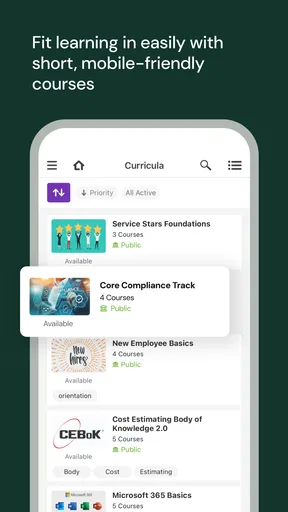
- Supports bite-sized learning that fits into busy work schedules.
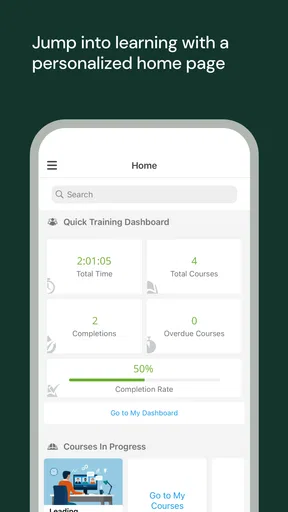
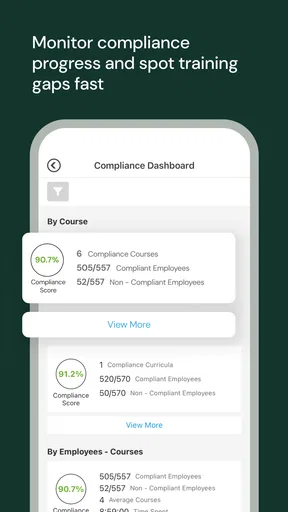
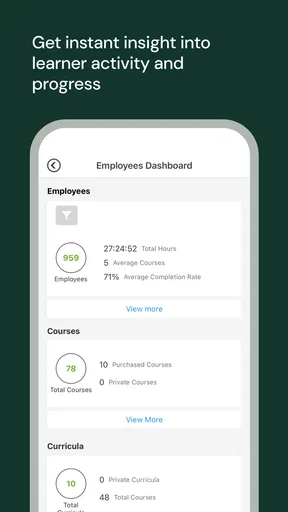
- Progress tracking helps users monitor completed courses and goals.
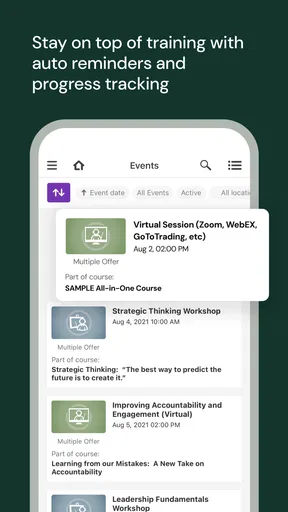
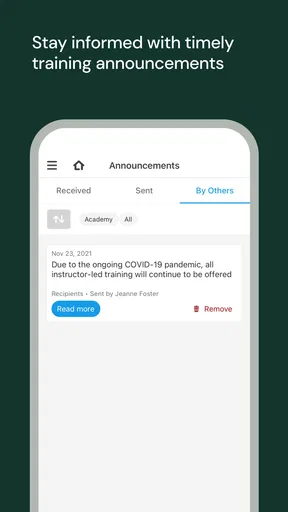
- Push notifications can remind employees about assigned training.
- Integrates learning with broader workplace development programs.
Limitations of UKG Pro Learning
- Some features may be unavailable unless the employer enables them.
- The interface can feel complex for first-time users.
- Course quality depends heavily on the employer’s uploaded content.
- Requires a stable internet connection for many learning activities.
- Frequent notifications may become distracting for some employees.
Other Releases by UKG, Inc.
View All


Similar Picks in This Category
View All
LinkedIn: Community & Network
LinkedIn3.8

Zoom Workplace
zoom.com4.1

Microsoft Teams
Microsoft Corporation4.6

Meta Business Suite
Meta Platforms, Inc.4.6

Webex Meetings
Cisco Systems, Inc.4.5

TeamViewer Remote Control
TeamViewer4.4
Frequently Asked Questions
What is UKG Pro Learning used for?
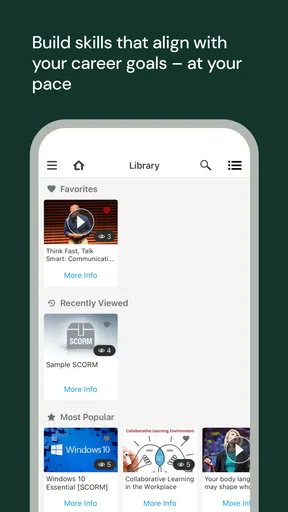
UKG Pro Learning is a workplace learning platform designed for employees, managers, and administrators. It allows users to access assigned courses, training paths, videos, documents, assessments, and other educational resources from a mobile device. Depending on the organization’s setup, it may also show recommended learning, compliance training, progress reports, certificates, and upcoming development activities.
Can I use UKG Pro Learning without an employer account?
Usually, no. UKG Pro Learning is primarily intended for organizations that use the UKG learning system, so access normally requires an account created or authorized by your employer, school, or another participating organization. Downloading the app alone does not provide access to its courses. You may need company credentials, a specific sign-in method, or an invitation from an administrator.
Does UKG Pro Learning work on Android and iPhone?
UKG Pro Learning is designed for mobile access and can generally be used on supported Android and iOS devices through the appropriate app or mobile experience. Before downloading, check the current store listing for operating-system requirements, available storage, and regional availability. Keeping your device and the app updated may also help prevent login, loading, or notification problems.
Can I complete courses offline in UKG Pro Learning?
Offline capabilities depend on how your organization has configured UKG Pro Learning and on the type of content being viewed. Some learning materials may be available for limited offline access, while interactive lessons, assessments, video streaming, progress synchronization, and certificates may require an internet connection. It is best to open the course online first and confirm whether offline viewing is supported.
Is UKG Pro Learning free to download and use?
The application may be free to download from the relevant app store, but access to its learning content is generally provided through an organization’s UKG subscription or account. Individual users typically do not purchase courses directly through the app. Your employer or administrator determines which training is available, whether mobile access is enabled, and how login or support requests are handled.
